Cartoonify Me – Toon Photos
- 4.0
- Rating
- 10.00M
- Installs
- Free
- Price
 Analysis by App-foxy
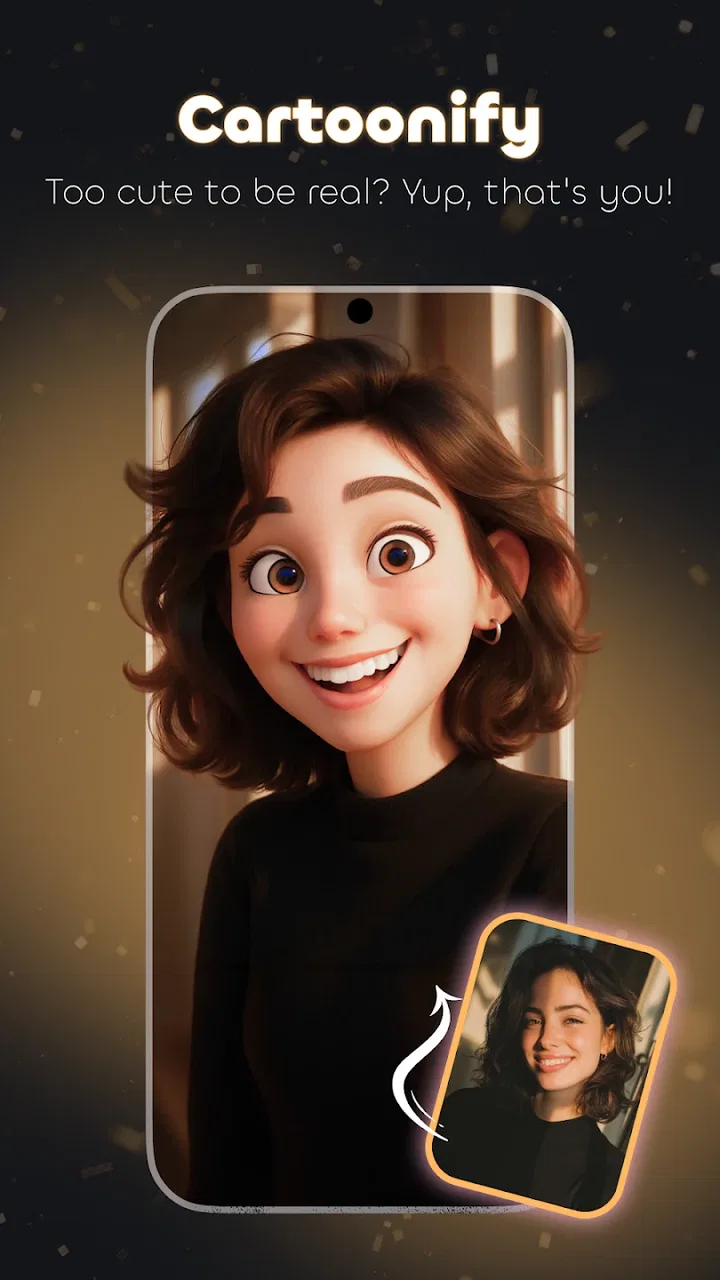
I enjoy photo apps that give me a visible result quickly, and Cartoonify Me – Toon Photos is built around exactly that idea. It takes an ordinary picture and turns it into a cartoon-style image or avatar, making it easy to create something more playful than a standard profile photo. I found it most useful when I wanted a quick visual change without opening a full editing suite and spending time adjusting every detail by hand.
This is a free photography app from Tiki Punch Studio, rated for Everyone and available for devices running Android 6.0 or later. Its current version is 5.3.0, and its popularity is easy to understand: it has passed ten million installs and holds an average rating of 4.0 from roughly thirty-one thousand ratings. Those figures suggest a broad audience, but they do not mean every photo will produce an equally convincing result. The quality of the original image still matters a lot.
My everyday workflow for turning a photo into a cartoon
My usual starting point is a clear portrait with one main subject. I prefer a photo taken in daylight, with the face visible and the background reasonably simple. That gives the app a cleaner starting point than a dark group photo, a heavily cropped image, or a picture where hair and clothing blend into the surroundings.
You May Also Like

 Google Keep - Notes and lists
Google Keep’s Quiet Growth Shows the Appeal of Simpler Notes
As mobile work gets busier, Google Keep keeps winning a simple contest: capture a thought quickly, find it later, and get on with the day.

 Blood Strike: 2.5 Anniversary
Blood Strike’s Loadouts Turn Every Drop Into a Tactical Gamble
A close look at Blood Strike’s custom loadouts: how fast access to signature weapons reshapes its battle royale rhythm, rewards preparation, and narrows the gap between fights.

 Pandora - Music & Podcasts
Pandora’s Music Is Easy to Start, but Harder to Recover
Pandora’s strength is its low-effort path from a seed to a station. Its weak spot is how much confidence it asks you to place in connection, setup, and quiet recovery.

 8 Ball Pool
 Is Built on Rivalries, Rematches, and Routine
A close look at the rivalries, rematches, shared routines, and unanswered safety questions that turn a quick pool match into a persistent mobile community.

 Samsung Music
’s Quiet Strength Is Playing What You Already Own
Its reach comes less from spectacle than from dependable access to a personal library. That simplicity is both the app’s strongest retention engine and its ceiling.

 AccuWeather: Weather Radar
AccuWeather Review: A Quick, Clear Forecast for Everyday Decisions
For everyday plans, the best forecast is the one you can understand quickly. AccuWeather makes rain timing, radar, and local conditions easy to act on, with a few trade-offs.
More From Our News Desk



After choosing an image, I look at the first cartoon treatment before making any other decision. This baseline preview is important because it tells me whether the photo suits the app’s visual approach. Some pictures become expressive and recognizable immediately, while others lose small facial details or appear too flat. If the first result already looks confused, repeatedly changing the style rarely fixes the underlying problem.
I then compare the available looks rather than accepting the first attractive thumbnail. A strong effect is not always the best effect. For a profile image, I usually prefer a treatment that keeps the eyes, face shape, and hairstyle easy to recognize. For a joke image or a casual post, I may choose something more exaggerated. The right choice depends on whether the image should represent me or simply make someone smile.
One practical habit is to keep the original photo untouched and treat the cartoon as a separate version. That sounds obvious, but it makes experimentation much easier. I can try a bold style, reject it, and return to the source without worrying about losing the natural picture. It also helps when I want two different results from the same portrait: one restrained avatar for a messaging account and one more playful image for sharing with friends.
The app works best when I decide the purpose before editing. If I am preparing a small avatar, I check the face at a reduced size because tiny details will disappear after cropping. If I am making a larger image, I pay more attention to outlines, background clutter, and whether the effect creates distracting edges. This simple change in perspective prevents me from choosing a result that looks impressive only when enlarged on the editing screen.
Choosing better source photos
The biggest improvement I can make usually happens before importing anything. A front-facing portrait with even lighting gives the cartoon effect a much easier subject to interpret. Side profiles can work, but they often produce a less balanced result because one eye or part of the face is partly hidden. Sunglasses, hats, and strong shadows may add personality to a photograph, yet they also remove information that helps the transformation look natural.
I also avoid using a busy background when the face is the main reason for editing. Trees, patterned walls, and crowded rooms can compete with the subject once the image is simplified into cartoon-like shapes. A plain background is not essential, but it makes the final image feel more intentional. If I want to preserve a lively setting, I choose a style that does not overpower the surroundings.
For a group picture, I first ask whether the result needs to preserve everyone’s identity. Cartoon effects can be fun on groups, but small faces and overlapping bodies make the outcome less predictable. When I need a reliable avatar, I crop to one person before applying the effect. When the goal is a shared joke, I accept that some faces may receive more convincing treatment than others.
Settings and choices that deserve a closer look
Cartoonify Me – Toon Photos is approachable because it does not force me to learn a complicated editing system. Still, experienced use comes from slowing down at the right moments. I check each available style, preview the image at the size where it will actually be seen, and avoid assuming that the most dramatic option is automatically the most successful.
The first setting worth checking is the visual intensity of the chosen treatment, where the available controls allow a softer or stronger appearance. A lighter result can preserve more of the original face and is often better for a professional-looking avatar. A stronger treatment may be more entertaining, but it can also exaggerate skin, hair, or facial proportions. I treat intensity as a communication choice: subtle results say “this is still me,” while bold ones say “this is a cartoon version.”
I also inspect the edges around hair and shoulders. These areas reveal problems faster than the center of the face. Loose strands, bright backgrounds, and overlapping objects can create rough-looking boundaries after processing. If the edge feels distracting, I try another source photo or a less aggressive style instead of expecting a final adjustment to repair it completely.
Color deserves attention too. A vivid cartoon may look appealing in the editor but become tiring when used as a small profile image. Muted or balanced colors can keep the face readable, especially against a colorful application interface. I often judge the image beside the background where it will appear, because an avatar that looks fine on a white preview may blend into a dark or busy profile layout.
One useful trade-off is between personality and recognizability. The most faithful result is not necessarily the most memorable, and the funniest result may not work when people need to identify me quickly. For social use, I tend to choose a middle ground. I want enough exaggeration to make the purpose clear, but not so much that the image looks like a different person.
A repeatable routine for profile images
When I create an avatar, I use the same sequence every time: select a well-lit portrait, compare several treatments, inspect the face at a small display size, and then check the outline around the head and shoulders. This routine is faster than randomly trying effects because it focuses on the details that matter for a small square image.
I also leave some space around the face when choosing the source. A tightly cropped forehead or chin may look acceptable in the editor but become awkward when the destination platform applies its own circular crop. Extra breathing room gives the final image a better chance of surviving that second crop. This is one of the easiest ways to improve the result without needing an advanced editor.
If I am preparing several avatars for different accounts, I keep the source lighting and framing reasonably consistent. The app can give each image a different cartoon treatment, but a similar pose and crop make the collection feel deliberate. This is especially useful for creators or small teams who want playful profile images without making every picture look unrelated.
Faster patterns for casual editing
The app is especially convenient for quick, low-pressure projects. A realistic everyday example would be receiving a friend’s birthday photo and wanting to turn it into a humorous greeting before sending it. I can choose a clear portrait, test a few cartoon looks, select the one that makes the expression easiest to read, and share the result without opening a desktop editor. The speed is more valuable here than total creative control.
Another good use is creating a temporary profile image for a group chat, event, or online community. I may not want to design a polished illustration, but a cartoon version of my existing photo gives the account a distinct identity in a few moments. Because the app is free, it is also easy to try without committing to a paid creative subscription just for one small task.
For repeat work, I avoid changing too many things at once. I choose the photo first, compare the main styles second, and only then consider refinements. This makes it easier to understand what improved the image. If I switch the source, style, crop, and intensity together, I cannot tell whether the result is genuinely better or simply different.
A useful shortcut in practice is to prepare a small selection of suitable photos before opening the editor. I pick two or three portraits with different expressions and lighting, then test the same style across them. This reveals whether the effect itself works for me or whether one particular photo is carrying the result. It also reduces the temptation to force a poor image through every available option.
I do not treat every output as final. Sometimes the first version is best for a profile picture, while a second version is better for a message or post. Saving or sharing the result that matches the intended use is more sensible than searching for one universal style. A restrained portrait and a highly stylized portrait can both be successful if they serve different purposes.
When the simple workflow is an advantage
Compared with a traditional photo editor, this app feels focused rather than expansive. A general editor gives me more control over layers, masks, color curves, retouching, and precise composition. That flexibility is valuable when I am designing a poster or correcting a difficult image, but it also adds time and decisions. Cartoonify Me – Toon Photos is better when the main goal is transformation, not complete image construction.
It also differs from manually drawing an avatar. Drawing gives an artist control over expression, clothing, background, and visual identity, while this app starts from a real photograph. That makes the result faster and more personal, but less controlled. If I need a character with a specific costume, pose, or fantasy setting, a drawing tool or avatar builder is likely the better choice.
Compared with a standard beauty camera, the emphasis here is not simply on smoothing or improving a selfie. The goal is a visible change of style. Someone looking for natural skin correction, detailed makeup controls, or camera effects should choose an app designed around those tasks instead. This tool makes more sense when I want the image to look intentionally illustrated.
Where the app reaches its limits
The main limitation is that an automated cartoon treatment cannot understand personal taste as precisely as I can. It may preserve a face well in one photograph and simplify it too much in another. Expressions with open mouths, unusual lighting, or partly covered faces can be especially difficult. I see the app as a quick creative filter, not as a replacement for a professional illustrator or a careful manual editor.
Background control is another important boundary. If the original scene is complicated, the cartoon effect may simplify it in a way that feels messy rather than artistic. I can improve the odds by selecting a cleaner photo, but I should not expect the app to perform detailed compositing work. When the background is central to the image, a dedicated editor with selection and masking tools will offer more dependable control.
Small details may also lose their importance during the transformation. Jewelry, subtle facial features, fine hair texture, and delicate patterns can become less distinct. That is not necessarily a flaw for a playful avatar, but it matters if the image is meant to preserve a person’s appearance accurately. I would not use a stylized result as the only image for an identity-sensitive purpose.
The free price makes experimentation easy, but it does not change the basic trade-off between convenience and precision. I can get a quick cartoon portrait without paying for a full creative suite, yet I should accept that the workflow is guided by the app’s available treatments. People who want exact control over every line, color, or background element may feel restricted.
Device compatibility is broad enough for older Android hardware because the app supports Android 6.0 and later, but the experience can still vary with the phone. Processing a photo may feel less immediate on an older device, especially when the image is large. I usually avoid importing unnecessarily huge files when I only need a small avatar. That keeps the task practical and avoids doing more work than the final image requires.
Privacy-minded users should also make their own comfort decision before selecting personal photos. I am comfortable testing ordinary portraits, but I avoid using images that contain sensitive documents, private locations, or people who have not agreed to be edited and shared. That is a sensible habit for any photo application, particularly when the output is intended for social use.
Who should use it, and who should skip it
I would recommend it to someone who wants a quick cartoon profile image, a playful greeting, or a simple way to give a familiar portrait a new mood. It is also a good fit for people who find full editing suites intimidating. The combination of a free download, an Everyone content rating, and a focused photography purpose makes it approachable for casual experimentation.
I would be more cautious about recommending it to a professional designer, photographer, or creator who needs repeatable visual control. For that audience, preserving exact colors, refining edges, removing backgrounds, and building a consistent character may matter more than speed. A layered editor or illustration program would be a stronger foundation, even if it takes longer to learn.
I would also suggest skipping it if the real goal is a natural-looking portrait enhancement. A cartoon treatment is intentionally obvious, so it cannot replace a tool centered on exposure, sharpness, skin correction, or realistic retouching. Choosing the right category of app is more important than trying to make one tool perform every type of editing.
My verdict after developing a repeatable habit
After using Cartoonify Me – Toon Photos as a focused photography tool, I see its strongest quality in the short path from ordinary portrait to shareable cartoon image. It does not ask me to become an editor before I can create something recognizable. When I begin with a suitable photo, compare styles carefully, and judge the result at its final display size, the app can produce a fun and useful avatar with very little friction.
The best results come from treating the process as a small workflow rather than tapping the first effect and stopping. Source selection, background simplicity, face readability, crop awareness, and the intended audience all matter. Those habits do more to improve the final image than endlessly switching between styles. I especially value the distinction between a profile avatar and a joke image: one needs clarity, while the other can benefit from exaggeration.
Its limits are clear, but they are reasonable for an app built around quick cartoon transformations. It is not a complete design studio, a precision retouching tool, or a manual illustration workspace. If I need exact control, I move to a more advanced alternative. If I want a fast visual change for a personal photo, this app is much easier to justify.
My recommendation is simple: use it when speed, personality, and easy experimentation matter more than detailed control. Tiki Punch Studio has made a focused tool for turning familiar photos into playful images, and the free access lowers the barrier to trying it. I would keep the original photo, test the result at its real use size, and choose the treatment that preserves the person’s character instead of automatically choosing the most dramatic effect. Used that way, it becomes a handy addition to a casual photo-editing routine rather than a disappointing substitute for a full editor.
FAQs for Cartoonify Me – Toon Photos
01What is Cartoonify Me – Toon Photos?
Cartoonify Me – Toon Photos is a creative app that allows users to transform their regular photos into cartoon-style images. The app offers a variety of filters and effects to give your photos a unique, animated appearance. It's perfect for users looking to add a fun, artistic twist to their pictures.
02Is Cartoonify Me – Toon Photos free to use?
Cartoonify Me – Toon Photos offers a free version with basic features and a limited selection of filters. However, to access premium filters and additional tools, users may need to make in-app purchases or subscribe to a premium version, depending on the app's pricing model.
03What are the key features of Cartoonify Me – Toon Photos?
The app provides a range of features, including multiple cartoon filters, editing tools, and customization options. Users can adjust brightness, contrast, and saturation to enhance their cartoon images. Additionally, the app supports easy sharing on social media platforms, making it user-friendly and versatile.
04Is Cartoonify Me – Toon Photos suitable for beginners?
Yes, Cartoonify Me – Toon Photos is designed with an intuitive interface, making it accessible for beginners. The app provides easy-to-follow instructions and a straightforward user experience, allowing users with no prior editing experience to transform their images into cartoons effortlessly.
05On which devices can I use Cartoonify Me – Toon Photos?
Cartoonify Me – Toon Photos is available for both Android and iOS devices. Users can download it from the Google Play Store or Apple App Store. The app is optimized for smartphones and tablets, ensuring smooth performance across various devices.
Pros
- Easy-to-use interface for all ages.
- Wide variety of cartoon effects.
- Quick processing speed.
- High-quality output images.
- Frequent updates with new features.
Cons
- Limited free features available.
- In-app ads can be intrusive.
- Occasional app crashes.
- Requires internet for full functionality.
- No batch processing option.

Cartoonify Me – Toon Photos
Gallery